Guitar and voice
Acoustic guitar, electric guitar, and vocals enter through an audio interface and receive their own hosted processing inside Loopy Pro.
Rig Walkthrough
Jack Skuse explains how Loopy Pro replaced the looper, guitar effects, vocal processing, playback, instruments, and control layers in his solo rig.
Quick Glance
An iPad-centred rig for looping, acoustic and electric guitar, vocals, backing tracks, AUv3 instruments, drums, and MIDI control.
A dedicated looper, acoustic and electric guitar processors, vocal mixer effects, backing-track playback, programmable drums, and separate instrument hosts.
Guitar and voice enter through an audio interface, then Loopy Pro hosts the loops, routing, mix, AUv3 effects, amp simulations, synths, and imported audio.
Compact or advanced MIDI footswitches, hardware pedals, keyboards with knobs and faders, plus a custom touchscreen canvas built around the performance.
From the Musician
Jack Skuse returned to live music as a solo guitarist and singer after years in a busy function band. His first compact setup centred on a T-Rex SoulMate Acoustic, whose built-in one-button looper made live looping feel like a natural direction. Looking for more tracks, effects, and control, he moved to a Boss RC-600.
The larger hardware looper promised guitar effects, vocal processing, and a much deeper looping system, but Jack found that navigating its small screen got in the way of the ideas he wanted to build. A Max Yar video led him to Loopy Pro. He installed it on an iPad he already owned, connected an audio interface, and began replacing one part of the live rig at a time.
“Very rarely is there a program that is so good and so powerful it makes me consider building everything around it.”
For Jack, Loopy Pro becomes both the looper and the host for the rest of the rig. A project can be a small one- or two-track setup, a much larger multi-track instrument, or a scene-based performance system with effects and custom controls. It can also host the processing and sound sources that would otherwise live in separate pedals, mixers, and playback devices.
That changes the upgrade path. Instead of finding space, power, and cabling for another dedicated box, Jack can first test whether an AUv3 plugin or a Loopy Pro workflow already covers the job. New sounds and functions join the project without changing the interface he uses on stage.
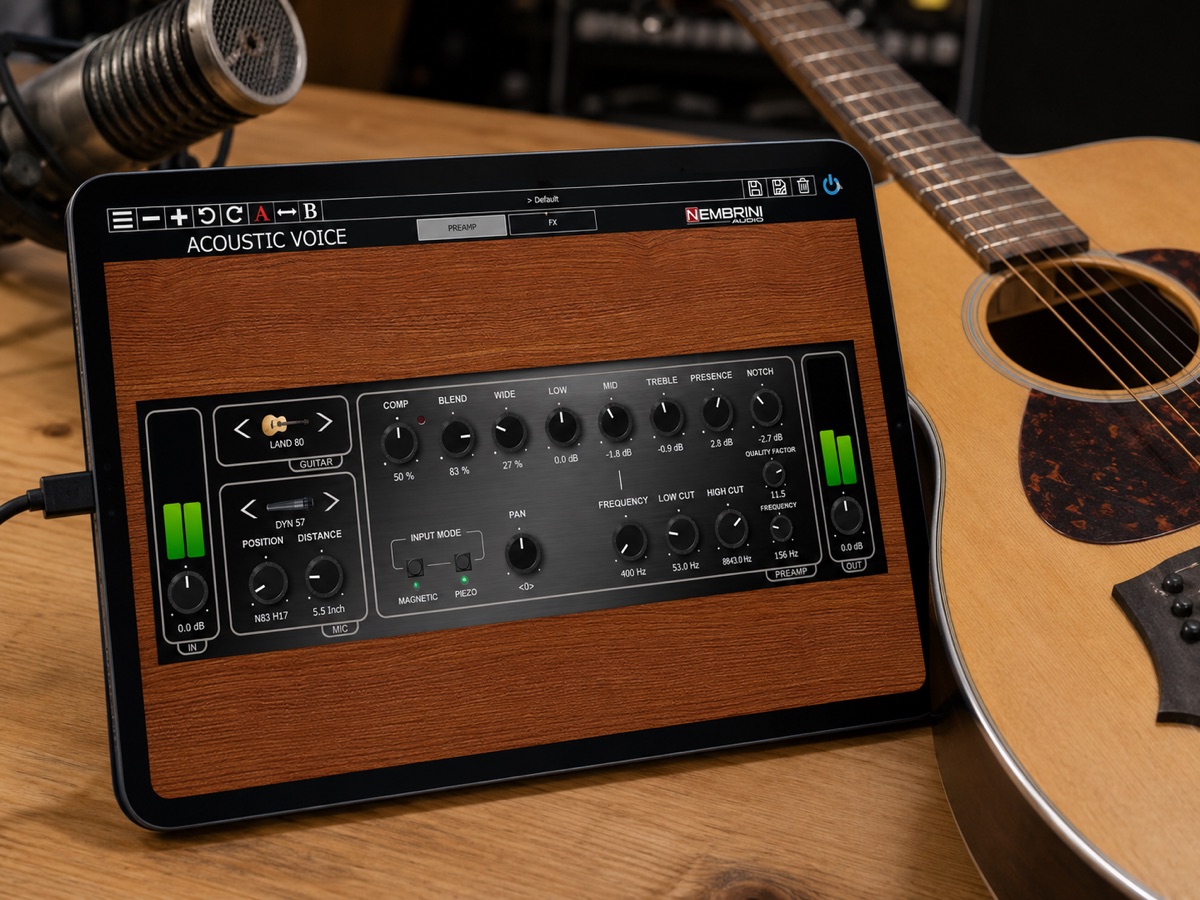
Jack starts with a dry acoustic guitar connected through his audio interface. Nembrini Audio’s Acoustic Voice supplies channel-strip processing, while a shimmer reverb creates the spacious sound he might otherwise turn to a dedicated ambient pedal to produce.
For a bass-like layer, Eventide QVox shifts the lower part of the guitar down an octave and a low-pass filter removes the brighter string content. The three examples cover basic acoustic tone, a large atmospheric effect, and a low register for looping. Together they replace three separate pieces of hardware.
The electric side follows the same model. Jack demonstrates ToneStack Pro as an all-in-one amp and effects environment with recallable presets, then points to the wider choice of iPad amp simulations and the newer option of loading Neural Amp Modeler captures.
The iPad screen is part of the appeal. Rather than editing a complex chain through a small hardware display, he can see and adjust the rig on a large touch surface. Loopy Pro remains the host around those sounds, so the guitar processing, loops, routing, and controls stay in one performance project.
Jack had still been carrying a Behringer XR18 so he could process vocals at gigs. Once the iPad and audio interface were already central to the setup, he questioned whether a separate digital mixer was still necessary for that role.
His example vocal chain is deliberately straightforward: EQ, compression, and plate reverb from FabFilter. The vocal enters Loopy Pro dry, passes through the hosted effects, and joins the rest of the performance mix. For this solo setup, the same host now covers looping, acoustic guitar, electric guitar, and vocals.
AUv3 hosting opens the rig beyond conventional guitar and vocal processing. Jack routes Scaler into a software synth to generate chord-driven parts. Prepared backing tracks or drum loops can be imported directly into clips, while an app such as Lumbeat’s Pop Drummer can supply programmable drums inside the project.
These elements do not need their own playback box or an isolated app running beside the looper. They can be routed, mixed, triggered, and looped alongside the live inputs, with the performance controls arranged around the way Jack actually plays.
Moving the rig into an iPad does not force a guitarist to give up physical controls. Jack shows the range of options: a compact M-VAVE Bluetooth footswitch for a small setup, a larger MC8 Pro for detailed MIDI control and feedback, a hybrid of hardware pedals and software, or a keyboard with knobs and faders for hands-on mixing.
That flexibility keeps familiar controls under Jack’s feet when both hands are occupied. A simple controller can cover the essentials, while a larger MIDI unit can expose more actions and provide clearer feedback as the setup grows.
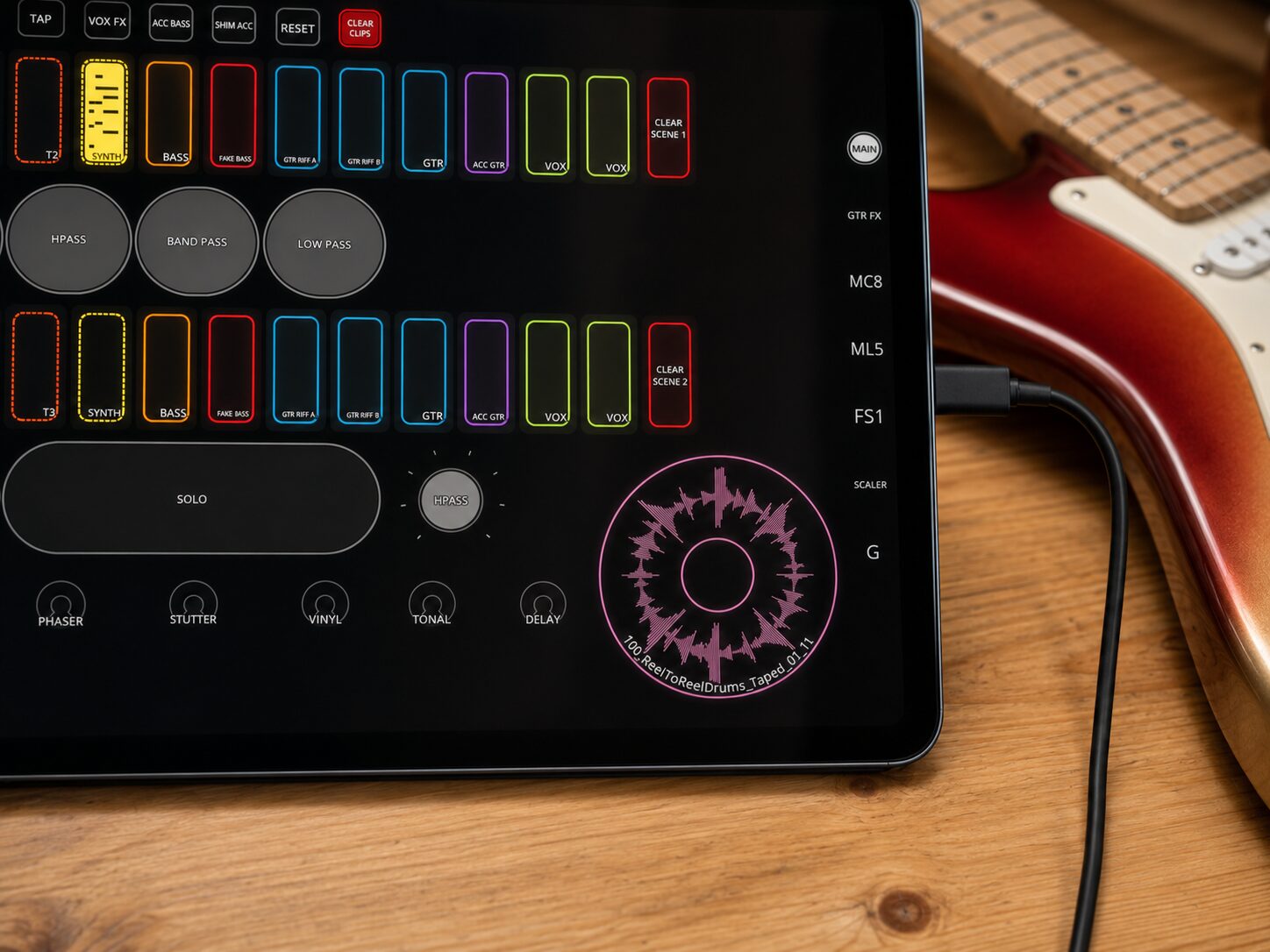
Jack describes the iPad and Loopy Pro as one of the most advanced hands-on controllers available for effects and music apps. The Canvas editor lets him build his own control surface without code or a separate editor.
Large buttons, faders, filters, and visual feedback can be arranged around the effects and actions he needs. As the rig changes, Jack can reorganise the screen so the controls continue to match the way he performs.
Jack did not replace an entire live system in one decision. The app first solved the looping problem, then absorbed acoustic effects, electric guitar processing, vocals, playback, instruments, drums, routing, and control. He eventually upgraded his iPad because the growing project had become so central to his return to live performance.
That gradual path is the useful idea behind the walkthrough. A musician can begin with the looper and interface they need today, then decide job by job what belongs inside the project. The complete rig emerges from those practical replacements rather than from trying to design everything at once.
Jack treats Loopy Pro as the expandable host around a solo guitarist and singer, replacing dedicated hardware one job at a time.
Acoustic guitar, electric guitar, and vocals enter through an audio interface and receive their own hosted processing inside Loopy Pro.
Channel strips, amp simulations, vocal effects, synths, imported audio, and programmable drums all share the performance project.
Footswitches and other MIDI hardware cover tactile actions, while the custom canvas provides large controls and clear visual feedback.
Each new requirement can be tested inside the existing host before another specialised pedal, mixer, or playback device joins the rig.