Four guitar outputs
Magnetic pickup, gooseneck microphone, and two piezo percussion sources feed separate processing paths for strings, natural acoustic tone, and kick triggering.
Artist Spotlight
Max Yar turns Loopy Pro into a serious acoustic fingerstyle hub: multi-output guitar processing, bus-channel pedalboards, MIDI control profiles, stepped dial song scripts, looping, and recording.
Quick Glance
A multi-output acoustic guitar rig using Loopy Pro as mixer, AUv3 pedalboard, looper, MIDI brain, and recording system.
iPad running Loopy Pro, custom acoustic pickup system, MOTU M6, Morningstar MC8, and extra footswitches.
Separate guitar sources feed distinct paths for mic tone, magnetic pickup effects, percussion hits, kick triggering, loops, buses, and recording.
One big template with song-specific control profiles, stepped dials, reset states, bus effects, and footswitch behavior that changes per song.
Watch The Interview
Max Yar came to guitar through classical training, but not the sealed-off kind. His school left room for Beatles songs and Spanish repertoire, and after graduating he found modern fingerstyle through players like Tommy Emmanuel and Andy McKee. That discovery opened a different idea of the instrument: one guitarist on stage, carrying melody, harmony, bass, percussion, and texture without needing the usual band around him.
That one-person-arrangement mindset still shapes the way Max plays. When he works on pop arrangements, he talks about singing the melody inside himself while the guitar takes over the vocal line. Fingerstyle is already a kind of internal bandleading, so looping arrived naturally as both a practice tool and a performance tool. It let him test layers, hear combinations that were impossible to play at once, and sometimes turn a sketch back into a solo guitar arrangement.
Alongside his own playing, Max built GoFingerstyle, a long-running Russian-language education project, and later LoopyMax, where he teaches guitarists how to build serious Loopy Pro setups. That educator’s eye runs through the whole interview. Even when the rig gets deep, Max keeps asking the practical question: what does a guitarist actually need under their feet when the song starts?
“Loopy Pro is not just some random app from the App Store. It’s a really professional tool that you can seriously use off stage and on stage.”
Electric guitar rigs have a familiar shape: guitar, pedals, amp or modeler, and a chain of effects that usually begins with a single signal. Max’s acoustic setup is different because the instrument is doing more than one job. He wants the natural wood, air, and transient detail of the guitar, but he also needs clean string processing, stage-safe low end, and percussion hits that can survive a real venue.
His current guitar sends four outputs into the rest of the system. A Fishman magnetic pickup captures the strings without the body percussion. A built-in gooseneck microphone captures the more natural acoustic sound. Two extra piezo discs are used for kick and percussive triggering. Those sources need different treatment. The mic can sound beautiful, but boosting its bass on stage would invite feedback. The magnetic pickup can take overdrive, reverse delay, octave effects, and stereo widening without dragging the whole guitar body through the same processing. The piezos can become a controlled low-frequency kick instead of a vague thump inside the guitar.
That is the problem Loopy Pro solved for him. Earlier hardware helped him get part of the way there, including a period using HX Stomp as an audio interface and MIDI partner, but Max eventually needed more than a couple of effect chains. With Loopy Pro, the four guitar sources can become a mixer, pedalboard, routing system, looper, MIDI control center, and recorder inside one performance environment.
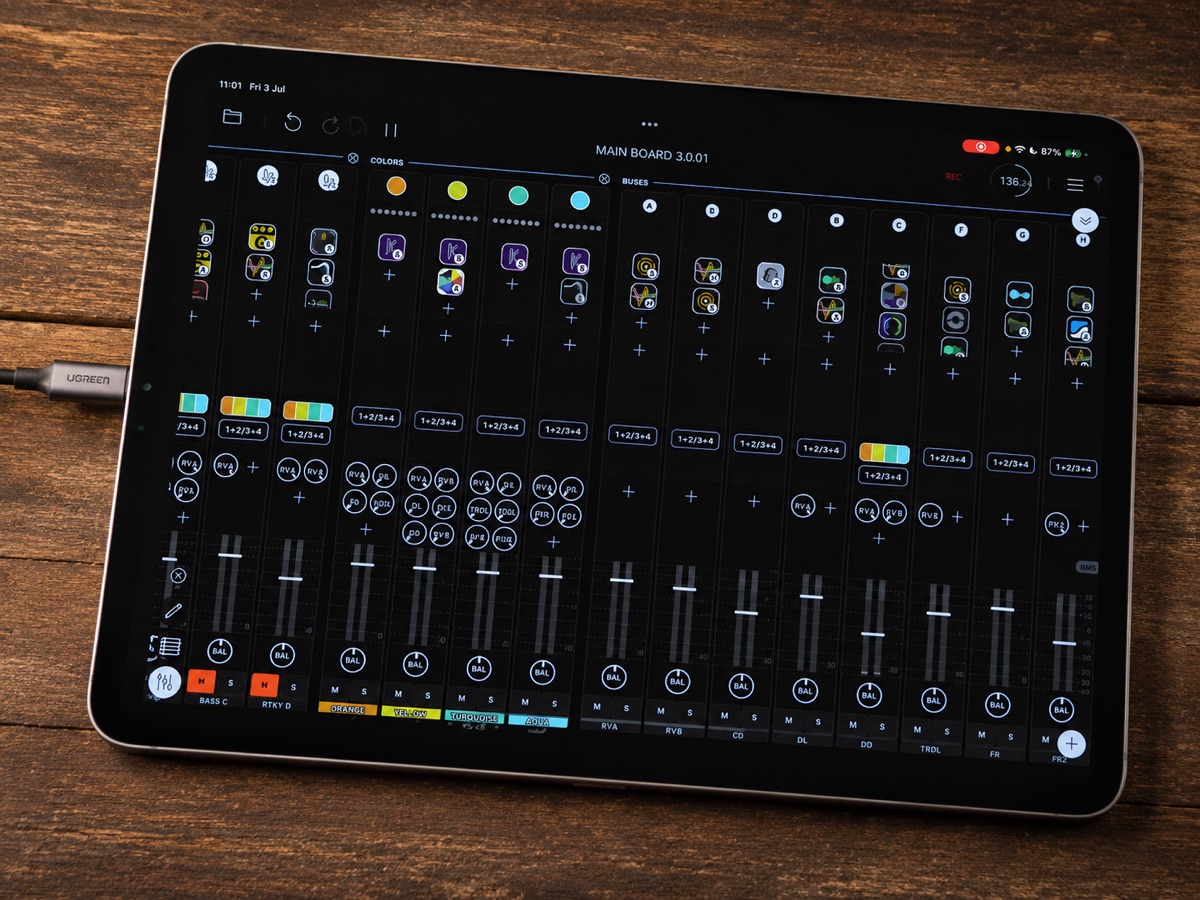
The rig runs through a MOTU M6 audio interface into an iPad running Loopy Pro. Max uses Morningstar MC8 foot control, extra footswitches, and song-specific control profiles so he can keep his hands on the guitar. On stage, the iPad is mostly for between-song decisions: choosing a song, adjusting a venue-dependent control, or checking the mixer. During the song, the floor does the work.
Inside Loopy Pro, Max leans heavily on bus channels. Rather than putting every effect directly on an input, he builds reusable processing strips: EQ, delays, filters, octave chains, widening, shimmer, overdrive, and more experimental glitch or texture effects. A reverse delay from Other Desert Cities can live on the magnetic pickup without coloring the mic. A ToneStack overdrive can sit behind the clean acoustic sound. Wider can push the processed strings outward in stereo while the natural guitar remains centered. Cascade can become a shimmer-like guitar atmosphere fed only by the strings.
The same setup also becomes a studio tool. Max can record a quick stereo mix when he wants speed, or capture separate channels when he wants options later. With the M6 and room microphones, the system can capture pickups, processed returns, and natural room sound. That matters because the stage sound and recording sound no longer have to be separate worlds.
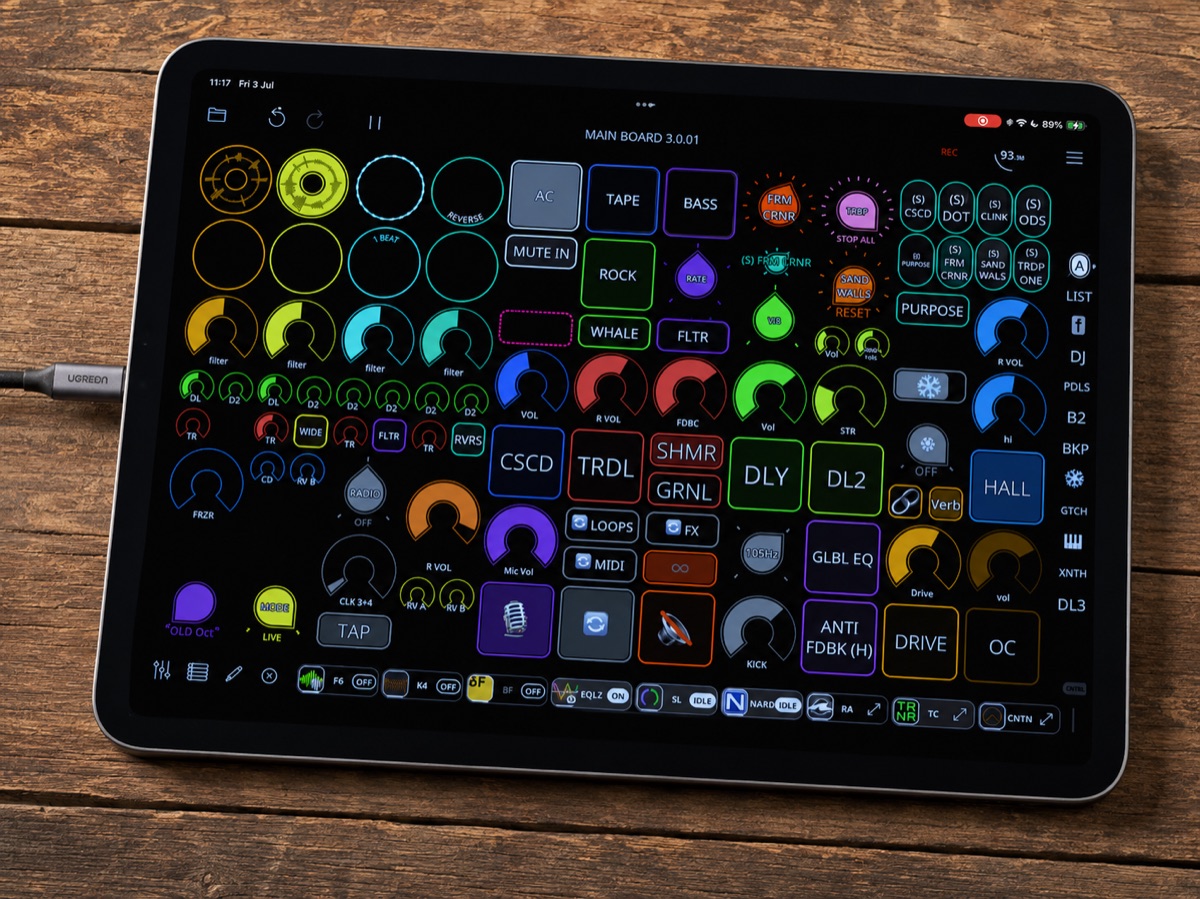
Max is a strong believer in one large template instead of a folder full of separate Loopy Pro projects. He brings the logic of a guitar pedalboard into the app: choose the next song, and the important controls move into position. Reverb, delay, overdrive, octave, looping behavior, and footswitch assignments can all change together.
The most revealing part is how he treats the same physical footswitch differently from song to song. In one piece it might toggle delay. In another it might bring in overdrive and octave. In another it might trigger a freezer effect used only for a single opening note. The point is not to make the layout clever for its own sake. It is to make the stage feel smaller.
Stepped dials are central to that idea. Max can script a whole song as a sequence of actions, then move through it with one footswitch: reset the state, wait for the first kick, record a loop, stop recording, bring delay in only on the loop, record the next part, save or reset if something goes wrong, and keep moving. He still leaves room for performance decisions with always-available controls for reverb, delay, and other expressive changes, but the structure of the song is under one reliable gesture.
“I’m trying to think more before going on stage and think less on the stage.”
One of Max’s cleanest examples is his kick setup. The piezo signal is not treated as a finished acoustic sound. It behaves like a drum trigger. Loopy Pro receives the signal, isolates the right frequency range and threshold, and triggers Fosfat so normal string playing does nothing but a deliberate body hit produces a controlled kick.
That gives Max stage-level control over a part of acoustic guitar performance that can otherwise be chaotic. He has a dedicated kick volume and a frequency selector, so at sound check he can ask the engineer which low-end target works best in the room: 80 Hz, 90 Hz, 105 Hz, 115 Hz, or whatever the venue can handle. A reset workflow lets those venue-specific positions become the safe return point for the show.
When Max first built his Loopy Pro template, he imagined needing ten or twenty loops. These days, he says four is usually enough. Some of the most interesting ideas are smaller than a full looped arrangement: a one-beat shaker, a reversed fragment, a filtered chord bed, a tiny rhythmic gesture sent into delay, or a short texture that keeps changing above the dry guitar.
That is where his ambient and soundscape work connects with the rig. Loopy Pro lets him try sounds he would never build a physical pedalboard around: shimmer, reverse delay, rhythmic gating, glitching, octave layers, filters, and wide stereo effects. He can compare old and new plugin chains quickly, keep the ones that earn their place, and move the retired controls to a backup page before deleting them.
The musical goal is variation. A loop that simply repeats can get crowded fast, especially with acoustic guitar. Filters create space without stopping the groove. Bus sends keep delay tails alive after a loop stops. Quantized controls let a reset or filter move land on the beat. The loop becomes something Max can breathe with instead of a block of audio he has to play over.
Max’s advice to new guitarists is refreshingly plain: start with fewer loops. Two tracks are already enough to spend many hours learning timing, loop endings, quantization, start and stop behavior, and arrangement. The first hard skill is not building the world’s most advanced template. It is learning to hit the end of the loop in time and make the recorded idea worth hearing again.
He is cautious about automation for beginners. A simple follow action can help when recording a performance, especially if one loop should lead into another, but Max thinks players learn best when they understand the musical workflow first. The best students already know something about the way they play: what they want their footswitches to do, which effects matter, how many layers they need, and where their attention should be during a song.
His practical suggestion is to sketch before building. Put the desired workflow on paper, then translate it into Loopy Pro. Back up the project, try a new idea, and return to the previous version if it does not work. For all the depth in his own template, Max keeps coming back to the same lesson: complexity is only useful when it gives the player more room to play.
“You don’t have to have a lot to have some fun. The most important thing is to record beautiful music.”
After moving from Russia to the UK, Max found himself starting again in a new musical context. GoFingerstyle had made him known in Russian-speaking guitar circles, but a new country and language loosened some of those expectations. It also raised new questions: covers or originals, fingerstyle or ambient guitar, busking or festivals, teacher or performer, lessons or albums.
Right now he is leaning into that uncertainty. He is working on an original fingerstyle album under the name Max Yar, playing original sets, and continuing to build LoopyMax as a place for guitarists who want to understand iPad-based performance without being buried by the technology. He is also planning course material around MIDI, synths, samplers, and the wider world that opens when a guitar player starts treating Loopy Pro as the center of a rig.
The interview ends with a lovely detail: some of Max’s compositions began as casual Loopy Pro jams or lesson examples. A sound was fun, a chord exercise needed a tune, an effect chain invited a response, and eventually the exercise became music. That may be the clearest picture of his setup. It is technical, yes, but only so ideas can appear faster, survive the stage, and sometimes turn into songs.
The interview shows how Max turns Loopy Pro into a stage-ready acoustic guitar hub for multi-output pickup processing, looping, MIDI control, and recording.
Magnetic pickup, gooseneck microphone, and two piezo percussion sources feed separate processing paths for strings, natural acoustic tone, and kick triggering.
Morningstar MC8, extra footswitches, Loopy Pro control profiles, and stepped dials let the same physical controls take on different jobs from song to song.
Uses bus channels, EQ, reverse delays, overdrive, octave chains, widening, shimmer textures, filters, and plugins including BYOD, Cascade, Other Desert Cities, ToneStack, Wider, Koala FX, and Fosfat.
MOTU M6 routing gives Max quick stereo capture when he wants speed, plus multichannel recording options for pickups, processed paths, and room microphones.