Three performance models
Free, metronome-based, and sequence-based looping can be chosen song by song without rebuilding the complete rig.
Rig Walkthrough
Mike Criscione demonstrates a Loopy Pro rig that moves between free, metronome-based, and sequence-based looping for solo shows and full-band performances.
Quick Glance
A colour-coded performance system for guitar, bass, keys, vocals, hosted instruments, MIDI control, sequenced arrangements, and weather-ready outdoor shows.
Free loops for spontaneous playing, metronome-based loops for a click-synchronised band, and sequence-based loops for automated arrangements.
iPad Air 5, Behringer XR18, powered USB hub, FCB1010 foot controller, Axiom 49 keyboard, compact Akai controller, and a second mixer-control iPad.
Colour-coded routing, hosted instruments and effects, fewer on-stage button presses, plus separate protection from direct sun, heat, and rain.
From the Musician
Mike Criscione has spent roughly twenty-five years working with loopers. His Loopy Pro rig now sits at the centre of both his solo performances and shows with his cover band, Ultraviolet, but the walkthrough begins with a useful reminder: live looping is not one fixed method.
Mike divides it into three approaches. Free looping follows the familiar pedal model, with the performer defining the start and end of each loop by foot. Metronome-based looping places every recording and transition against a shared tempo. Sequence-based looping adds a timeline where recording, playback, mixing, and other actions can be arranged before the performance begins.
Mike uses Loopy Pro for all three approaches without rebuilding his setup. The walkthrough moves from an open-ended solo song to a click-synchronised band arrangement and then to a more extensively programmed original.
“It’s sort of become the heart and soul of my setup.”
The main canvas uses colour to make a busy setup readable. Orange represents acoustic guitar, green electric guitar, blue bass or subharmonic synth, purple keyboards and synths, red drums, and yellow vocals. Each colour group can be recorded, processed, mixed, and brought in or out independently.
That visual organisation is especially helpful when a song moves between sections. Mike can see what belongs to each musical role without reading small labels or tracing a conventional mixer. The template makes the arrangement legible while the physical controllers handle the actions that need to happen under his hands and feet.
Mike’s first example works like a conventional hardware looper. He records a guitar progression with a foot press, closes the loop on the next pass, adds a subharmonic bass line, and overdubs another guitar part. The tempo and loop length are created by the performance rather than decided in advance.
Some custom workspaces can make Loopy Pro look complicated at first glance, and Mike shows that the same system can still behave like a straightforward pedal looper when that is what the music needs.
For Ultraviolet’s version of Lizzo’s Juice, Mike switches to a metronome-based setup. The session has a predefined tempo, the band hears a click, and Loopy Pro keeps the loop lengths aligned to that tempo. Mike can queue the next section while the current section is still playing; Loopy Pro brings it in at the next section boundary.
The loop, chorus, post-chorus, and added layers arrive on the downbeat even when Mike presses the control early. The performance remains responsive without requiring a perfectly timed pedal press for every transition.
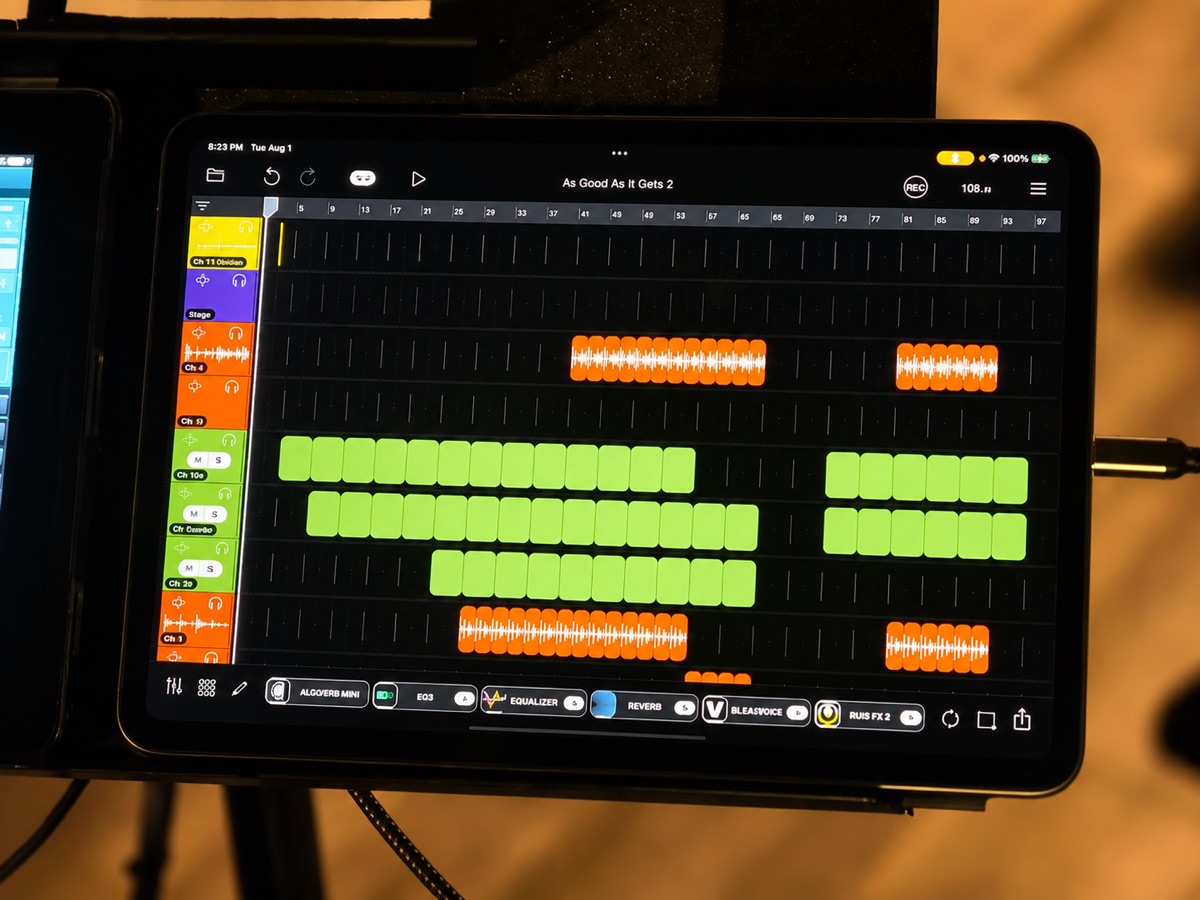
Mike’s original song As Good As It Gets demonstrates the third model. Some parts are pre-recorded, while guitar and bass loops are recorded live. Sequencers determine when those recordings repeat and when different elements enter or leave.
He also uses silent “dummy loops” containing follow actions. They can mute a source, adjust a level, switch an effect, or trigger another Loopy Pro function without adding audio. Once Mike records a live phrase, Loopy Pro can reuse it in the sections already planned on the timeline.
“The more complicated a setup you get, the more the button presses take you out of the song and take you out of the performance.”
Loopy Pro also hosts the sound sources and processing behind the canvas. Bias FX handles guitar sounds and responds to MIDI preset changes. AudioLayer provides sampled instruments, Ravenscroft 275 supplies piano, Galileo adds a drawbar organ controlled from the keyboard, and B Voices creates keyboard-directed vocal harmonies.
The external gear is therefore mostly control and I/O. An iPad Air 5 runs Loopy Pro, while an older iPad controls the Behringer XR18 mixer. A powered USB hub keeps the iPads, XR18, and controllers connected and charged. On the floor, a Behringer FCB1010 provides ten switches and two expression pedals. An Axiom 49 keyboard controls instruments and organ drawbars, while a small Akai controller recalls guitar presets.
The final part of Mike’s walkthrough addresses a less glamorous part of professional iPad performance: weather. An iPad merely controlling a mixer is replaceable during a show; an iPad processing every instrument and running the loops is mission-critical.
For outdoor work, he places the iPads on a USB cooling pad and uses a collapsible photographic monitor shade to block direct sunlight. The distinction between ambient heat and solar radiation matters because a tent may stop rain without stopping low-angle sun. He has used the shaded, fan-cooled setup through three-hour outdoor gigs while the iPad remained charged.
Rain is treated separately. Clear plastic bags can be pulled over pedals, stands, or control surfaces quickly, protecting gear from falling rain and splash from the stage. The broader lesson is that outdoor reliability includes shade, cooling, power, and weather protection, not just the app alone.
“Heat protection and water protection are really two independent things.”
One colour-coded workspace supports spontaneous solo looping, click-synchronised band arrangements, and sequence-driven original music.
Free, metronome-based, and sequence-based looping can be chosen song by song without rebuilding the complete rig.
An iPad Air 5 runs Loopy Pro, a Behringer XR18 handles audio I/O, and a powered hub connects and charges the wider system.
An FCB1010, Axiom 49, compact Akai controller, and older mixer-control iPad divide performance tasks across familiar hardware.
Active cooling, direct-sun shading, dependable power, and separate rain protection keep the mission-critical iPad operating.